
Receiving
Receive in one place. The quantity stays on the stock file you already keep.
Home / CIMARA / CIMARA Essentials

CIMARA™ Essentials
CIMARA Essentials is part of the CIMARA retail platform for travel, tourism, and destination businesses, by Frontier Retail, Inc. CIMARA Essentials is included with CIMARA Core and also works with NCR Counterpoint locations and item files. It is not included with CIMARA SCO (Self-Checkout/Kiosk). It is the floor-tool suite. Inventory Snapshot handles physical inventory counts today. Mobile inventory is the handheld for the stock file you already keep. Look up quantity on hand, price, margin, and SKU on the floor. Scan a barcode for a physical count, a receipt, or a transfer to another location. Price structures, shelf analysis, and bundles stay in that same work. Receive in one place, then send the right quantity out to the other locations. Ticket validation and in-store messaging are coming soon on the same device. It is not a separate charge.


Part of the CIMARA platform · CIMARA Essentials · Inventory Snapshot handles physical inventory counts today.
What it is
CIMARA Essentials is CIMARA’s suite of associate tools. CIMARA Essentials is included with CIMARA Core and also works with NCR Counterpoint locations and item files. Inventory Snapshot is the physical count on a phone or handheld. Scan on the floor, review expected-versus-actual in CIMARA, and post the snapshot back to the inventory file you already run. CIMARA connects to the systems you already run, with integrations like NCR Counterpoint, and works with your existing products and customers, so you can start today and move at your own pace.
Mobile inventory is the handheld for the stock file you already keep. Look up quantity on hand, price, margin, and SKU on the floor. Scan a barcode for a physical count, a receipt, or a transfer to another location. Price structures, shelf analysis, and bundles stay in that same work. Receive in one place, then send the right quantity out to the other locations. Ticket validation, stock checks, and in-store messaging are coming soon on the same handheld. They are not separate apps.
Associates count where the merchandise actually sits: sales floor, end cap, stockroom, or warehouse. Managers open the same snapshot in CIMARA on the desktop to see exact matches, small variance, and large variance, then post the count when it is ready.
Two form factors, one system. The mobile app is built for scanning and speed. The CIMARA web view is built for review, notes, and posting. Both stay connected to Counterpoint inventory, locations, SKUs, and units of measure.

Mobile inventory
Mobile inventory is the handheld for the stock file you already keep. Look up quantity on hand, price, margin, and SKU on the floor. Scan a barcode for a physical count, a receipt, or a transfer to another location. Price structures, shelf analysis, and bundles stay in that same work. Receive in one place, then send the right quantity out to the other locations.
Receive in one place. The quantity stays on the stock file you already keep.
Scan a barcode for a transfer to another location, then send the right quantity out to the other locations.
Price structures stay in that same work. Look up price, margin, and SKU on the floor.
Coming soon
These jobs are not in Inventory Snapshot. When they ship, they join CIMARA Essentials on the same associate device — not a second app.
Scan a ticket on the guest's phone or a paper ticket and confirm it is valid for the event — at the door, on the lot, or wherever the guest presents it. The same scan can spot-check a customer’s basket on the floor: does what they are carrying match the ticket they were issued, without walking them back to the register.
Scan a barcode and see on-hand for this location without starting a physical count. Snapshot remains the count cycle. This is the look-up.
Message devices on the floor — a pickup, a door that needs a second associate, a price that just changed — without pulling people off the sales floor to a back-office screen.
Why retailers use Inventory Snapshot
Paper worksheets and after-hours keying create shrink you cannot explain. Inventory Snapshot keeps the count in the same ecosystem as selling, receiving, and reporting.
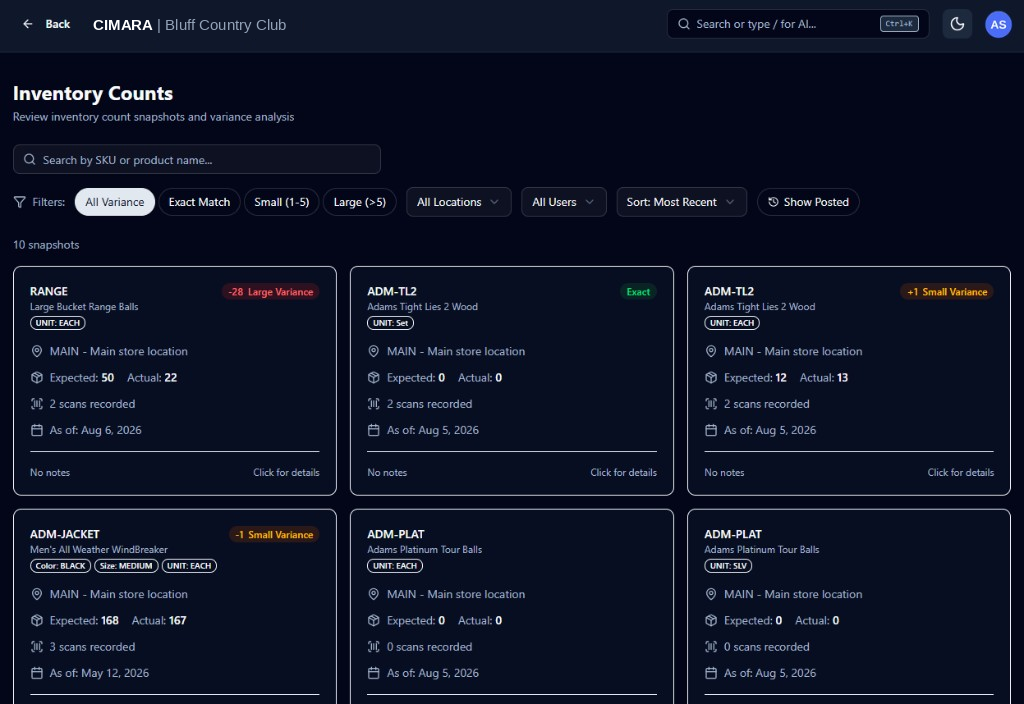
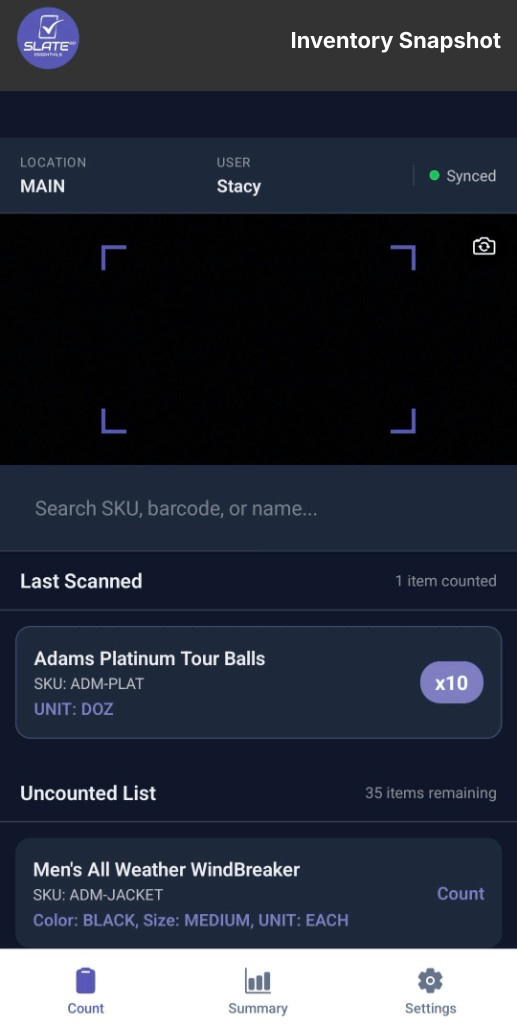
Scan a barcode, confirm the SKU and attributes, then tap +1, +5, or +10. Location and user stay visible so every count is attributable.
PartnerTech native scanner, keyboard-wedge mode, or the device camera. Search SKU, barcode, or name when a label will not scan.
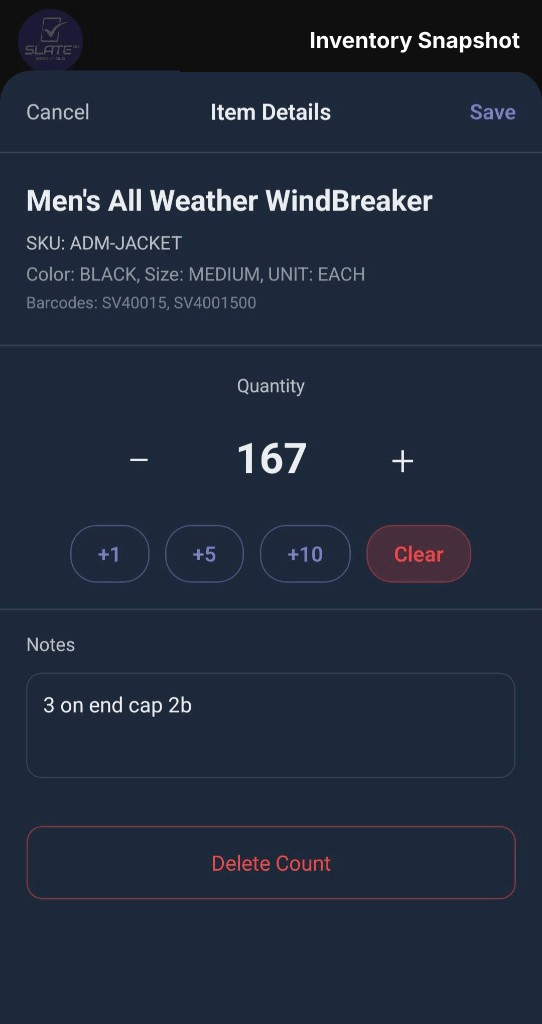
CIMARA Inventory Counts compares expected and actual. Filter exact match, small variance (1–5), and large variance (>5).
Record “3 on end cap 2b” while you are standing there. Notes follow the item into CIMARA count records.
Load stock for the location you are counting. Color, size, unit of measure, and barcodes travel with every SKU.
Counts land in CIMARA, the same AI-enabled platform retailers already use for conversational search.
How it works
A complete physical inventory cycle that starts in CIMARA Essentials and finishes in CIMARA. The count posts back to Counterpoint when that is the back office.
Inventory Snapshot fetches on-hand stock for the selected Counterpoint location so the team knows the count file is complete.
Use a PartnerTech gun, a keyboard-wedge scanner, or the device camera. If a tag will not read, search SKU, barcode, or product name.
Adjust quantity with plus/minus or quick-add buttons, attach a note, and save. Uncounted items stay on the list until the floor is done.
Open Inventory Counts in CIMARA. Filter variance, inspect count records by user and timestamp, then post when ready.
CIMARA Essentials · Inventory Snapshot
Count screen
Location and user stay in the header. A live sync indicator shows the device is connected. The camera viewfinder sits above search so a gun scan or a camera scan lands in the same list.
Item details
Open an item and you see the description, SKU, color, size, unit of measure, and barcodes. Quantity controls are large enough for gloved hands. Notes capture what the number cannot.
CIMARA web
Inventory Counts
Search by SKU or product name. Filter All Variance, Exact Match, Small (1–5), or Large (>5). Narrow by location and user. Sort by most recent.
Frequent questions
CIMARA Essentials is included with CIMARA Core and also works with NCR Counterpoint locations and item files. It is not included with CIMARA SCO (Self-Checkout/Kiosk) or CIMARA Ask AI, and it is not a separate charge. Inventory Snapshot is the count on a phone or handheld. Managers review expected versus actual in CIMARA. Inventory Snapshot handles physical inventory counts today. Mobile inventory is the handheld for the stock file you already keep. Look up quantity on hand, price, margin, and SKU on the floor. Scan a barcode for a physical count, a receipt, or a transfer to another location. Price structures, shelf analysis, and bundles stay in that same work. Receive in one place, then send the right quantity out to the other locations. Ticket validation and in-store messaging are coming soon in the same app.
The physical count component of CIMARA Essentials. Scan on the floor, capture actual quantities with notes, review variance in CIMARA, and post the count back to the inventory file you already run.
Inventory Snapshot is the floor-and-review experience beside that file. Associates count on a phone or handheld, managers review variance in CIMARA, and the snapshot can post back to the on-hand you already keep.
Ticket validation, stock checks, and in-store messaging are coming soon. Ticket validation will confirm event tickets from a phone wallet or paper, and can spot-check a customer’s basket on the floor. They are not in Inventory Snapshot. When they ship, they join CIMARA Essentials on the same handheld.
Native PartnerTech hardware scanners, keyboard-wedge scanners that type into the app, and the device camera (front or rear). Teams can also search SKU, barcode, or product name when a label will not scan.
CIMARA compares expected on-hand from Counterpoint with actual counted quantity. Exact matches, small variance (1–5 units), and large variance (greater than 5) are color-coded and filterable.
Venue operators who need attributable, location-true physical counts. CIMARA Essentials is included with CIMARA Core and also works with NCR Counterpoint locations and item files.
Get started with CIMARA
Book a demo. We will walk the physical count flow: scan, variance, and post. Ticket validation and in-store messaging are coming soon.